 TOPDREAMWEAVER
 extensions
TOPDREAMWEAVER 

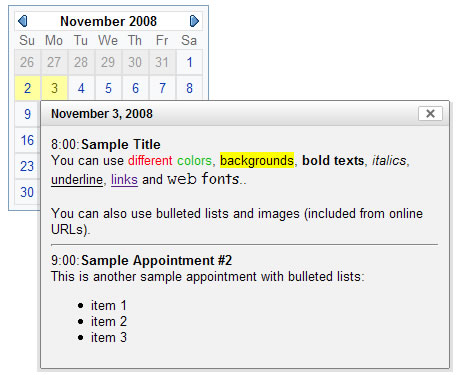
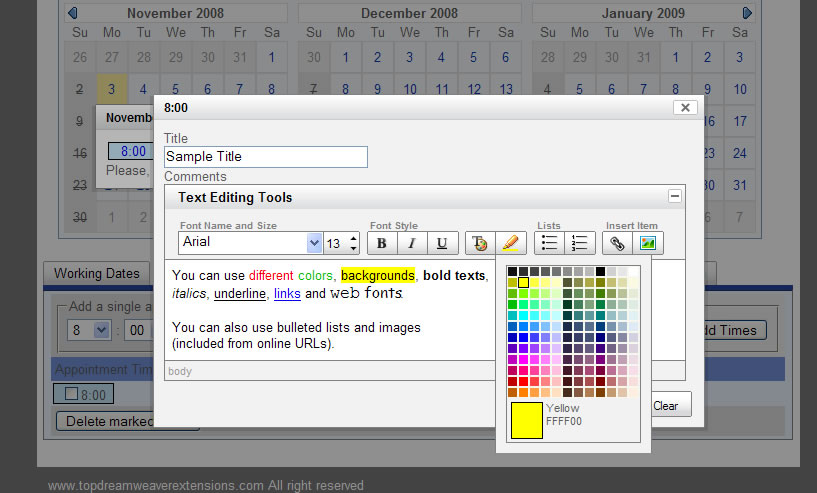
This is a special version of our standard Dreamweaver ASP Appointment Calendar, it contains all the features from the standard version and includes the following special features:
IMPORTANT: This software has the following requirements:
Optional requirements:
Note: This product does not require external database systems; the information is kept in text files in a folder on your website. This way the technical requirements are low while the installation and use are kept simple and straightforward.
Help & FAQ & Videos
The sample, installation instructions, video tutorial/demo and extended information are present in the standard ASP Appointment Calendar page.
Additional Info: ASP Appointment Calendar w/ HTML Editor - Online FAQ.
Development Notes
Tip: To change the 24-hour clock to 12-hour clock go to the file "TDEAppCalendar.js", find the setting mCfg.MILITARY_TIME = 1; in the first lines and change it to 0 to use a 12-hour clock.
You will find other useful settings on that file (start weekday, date delimiters, month/day position, ...).
Download ASP Appointment Calendar w/ HTML Editor
|
Preferred payment & download method:
|
|
|
Paypal or Credit Cards: |
PRICE
After payment you will be redirected to a direct-download page and the download link will be emailed to the payment address.
USD $49.99 |