How do I set write permissions on the required folders?
Dreamweaver Link Calendar requires to set write permissions on folder "
TDE_LinkCalendar/admin/database".
FTP programs ("clients") allow you to set permissions for files and directories on your remote host. This function is often called chmod or set permissions in the program menu.
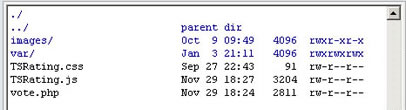
In the first image, look at the last column - that shows the permissions. It looks a bit confusing, but for now just note the sequence of letters:
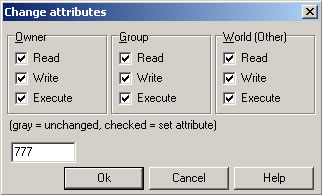
Right click the folder or files to set permissions, and usually a popup screen will appear (see the second image):
Don't worry about the check boxes. Just delete the 'Numeric value:' and enter the number you need - in this case it's 777 or simply mark all checkboxes. Then click OK.
That's all.
How can I change the size and/or colours?
Go to the file "public.css" and there you will find the following styles:
Line #14 - style for the external border; background and border:
.yui-calcontainer {
float:left; padding:5px; background-color:#F7F9FB; border:1px solid #7B9EBD;
}
Line #42 - style for width, height, border and background for all cells:
.yui-calendar td.calcell {
width:2em; height:2em; border:1px solid #E0E0E0; background-color:#FFF;
}
Line #46 - style for the current month's cells:
.yui-calendar td.calcell a {
color:#003DB8; text-decoration:none;
}
Line #53 - style for the cells with days that do not belong to the current month:
.yui-calendar td.calcell.oom {
cursor:default; color:#999; background-color:#EEE; border:1px solid #E0E0E0;
}
Line #79 - style cells with associated information (events, links):
.yui-calendar td.calcell.reserved {
background-color:#FFff00;
}
Line #107 - style for day's names:
.yui-calendar .calweekdaycell {
color:#666; font-weight:normal;
}I'm getting a "Internal Server Error" when accessing to the admin area, why?
Probably you set write permissions(777) to the folder "TDE_LinkCalendar/admin" instead of "TDE_LinkCalendar/admin/database".
Note that the folder "TDE_LinkCalendar/admin/database" must have write permissions (777) but the folder "TDE_LinkCalendar/admin" contains PHP files, so it should have the standard 755 permissions.
How can I center the calendar?
Use a code like this one:
<div style="text-align:center;"><div style="margin-left:auto;margin-right:auto;width:210px">
...insert the calendar here...
</div></div>
I'm getting problems to display the calendar en Internet Explorer 6. What is the problem?
Probably you are using charset utf-8, please change it to iso-8859-1, replace your current charset metatag by this one (on the head section of your page):
<meta http-equiv="Content-Type" content="text/html; charset=iso-8859-1" />Can I change day start of the week? I need to begin with Monday not Sunday.
Go to the file "calendar.js" and replace the line 860:
START_WEEKDAY : 0,
...by this:
START_WEEKDAY : 1,
Can I change the date format?
You can set it to "month/day/year" or "day/month/year". To change the format open the file "calendar.js" with any text editor and locate the line (approximately line #378) that says:
invertDate : false,
The default value "false" means "month/day/year", if you want to change it to "day/month/year" change it to true:
invertDate : true,
Please remember to upload again the file "calendar.js" to your online web server and to clear the browser cache after this step.
I'm inserting the calendar in a template or I need to fix the calendar's folder in a different location, what configuration steps should be applied?
Follow these steps:
- In your page you must change the reference to the public.js file to an absolute reference, for example (absolute path to the site's root):
<script type="text/javascript" src="/TDE_LinkCalendar/public.js"></script>
- Open the file “public.js” and in the line #1 change the path to the calendar folder (absolute path to the site's root), example:
var pathCalendar = "/TDE_LinkCalendar";
- Open the File “TDELinkCalendar.js” and in the line #1 make the same change than above, example:
var pathCalendar = "/TDE_LinkCalendar";
...note that the leading "/" means that the folder is located in the main site's root folder. If you want to put the folder into the "templates" folder then this will be the correct value:
var pathCalendar = "/Templates/TDE_LinkCalendar";
What is the file format used to store the data?
If you want to read or write events directly from the data files (only for advanced users with coding skills) you need to know the file structure used to store the appointments.
The file structure used is the following:
dateStart-dateEnd<line break>
link<break>
target<line break>
separator<line break>
Example:
1/20/2010-1/23/2010
http://www.topdreamweaverextensions.com
_self
*-*
3/14/2010-3/18/2010
http://www.dwbooster.com
_blank
*-*
Note that *-* is used as separator.
I get this error when trying to install: "Extension requires more recent version of Macromedia Extension Manager". What I should do ?
You can download the newest version of the Adobe Extension Manager here:
http://www.adobe.com/exchange/em_download/
If you have more than one extension manager installed in your computer, then open the version related to the Dreamweaver version where you want to install the extension and open the .MXP file from there.
I haven't received the email with the download link or I lost the download link. How can I get it?
If you purchased the product using
Google Checkout, the instructions for accessing your purchase will appear in a
yellow box at the top of your Order Receipt page (into your Google Checkout account):
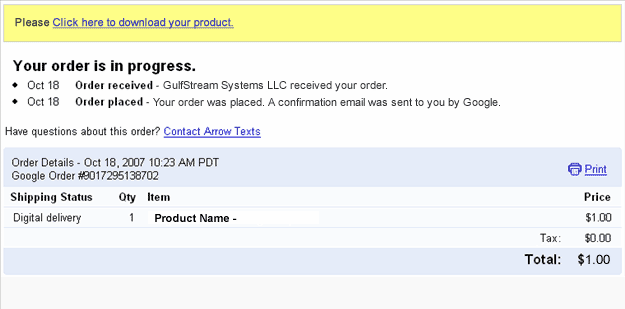
After accessing that link you will get a copy of the product and a copy of the download link will be sent to your email address. Please be sure to check your spam/bulk mail folder if you don't see the email into your inbox.
Are there alternative payment options?
You can pay directly with credit cards through Paypal. If you don't have credit card or your credit card is not accepted by the payment gateway then you can use the alternative methods offered by Paypal and Moneybookers.
You can upload funds to your
Paypal or
MoneyBookers account through bank transfer or alternative methods.
If you can't create a
Paypal account, then you can use
Moneybookers that accepts customers from a wide range of countries and a wide number of credit cards and domestic bank transfers.
Do you include a multi-site license with the single purchase?
Our extensions are "one time purchase" products. That means:
1- You can use it on all your computers.
2- You can use the extension on as many websites as you want (no limit), this includes your own websites and websites created by you for other pleople.
3-
You are not allowed to redistribute the extension to other users.
4-
You are not allowed rebrand or resell the product.
Can I pay using my credit card ?
Yes, Paypal allows you to pay directly using your credit card. You don't need to create a Paypal account to complete the payment.
On the other hand,
MoneyBookers accepts credit cards when uploading funds to your own
MoneyBookers account.
Are these extensions MAC compatible ?
Yes, our extensions are tested in both MAC and PC, you can install and use our extensions in any platform that supports Dreamweaver.
Are these extensions ready for Dreamweaver CS4?
Yes, our extensions are compatible with the most recent Dreamweaver versions.
We also support older Dreamweaver versions, usually Dreamweaver MX, MX 2004, DW 8, CS3 and CS4.
When I preview my web page atfer I get this message in my Internet Explorer,"To help protect your security, Internet Explorer has restricted...". What is the problem?
If you are testing your page directly from your local hard disk in IE 7, this message appears:
"To help protect your security, Internet Explorer has restricted this webpage from running scripts or ActiveX controls that could access your computer. Click here for options."
In IE 7 this message appears when you test a web page that contains a script or Flash item directly form your local hard disk. When you upload your page to an online web server that message does not appear.
The address from a web server must start with http:// or https:// . On the other hand if the address start with C:\ or file:// then you are testing it from your local hard disk.
Just upload your web page to your web site and you will see that the error disappears.
I'm getting this error message "Is not possible to create data structure.". What's happening?
Please, change the "Links relative to" setting in the site configuration options (Dreamweaver 8 or later).
If this setting does not solve the problem, then follow these steps:
- Restart Dreamweaver
- Be sure that you have a local web site defined in Dreamweaver
- Open the page where you want to insert the extension(this page must be saved previously into your web site)
- Try to insert the extension again
Note about sales taxes.
No sales tax is charged when you purchase via
PayPal. You can order via PayPal with a credit card even if you do not have a PayPal account.
PayPal's status as a financial institution exempts PayPal orders from sales tax. CodePeople will be the retailer of record. CodePeople is based in Switzerland and does not have any US sales tax obligations.
I'm getting this error: "TypeError: THE_DOM has no properties" . There is a workaround?
Please follow these steps:
- Check if you have defined a local web site at dreamweaver.
- Check if you have saved the page into your local web site.
- If you are using Dreamweaver templates, check if your templates allow an "Editable Region" in the <HEAD> section of the HTML code.
- Mark the "Use case-sensitive link checking" option in the site settings and recreate your site cache.
- After these checks, please restart your Dreamweaver and try again.
If the above actions don’t solve the problem, then probably the reason is a wrong HTML structure in the page that you are trying to use the product, in this case, please check the page’s HTML structure and if you cannot find the problem then contact our support service.
 TOPDREAMWEAVER