How do I set write permissions on the required folders?
Newsletter for Dreamweaver (TDE Newsletter) requires to set write permissions on folder "
TDE_Newsletter/database".
FTP programs ("clients") allow you to set permissions for files and directories on your remote host. This function is often called chmod or set permissions in the program menu.
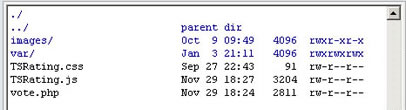
In the first image, look at the last column - that shows the permissions. It looks a bit confusing, but for now just note the sequence of letters:
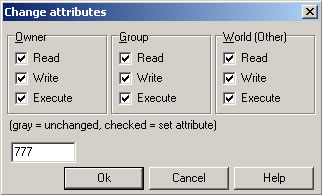
Right click the folder or files to set permissions, and usually a popup screen will appear (see the second image):
Don't worry about the check boxes. Just delete the 'Numeric value:' and enter the number you need - in this case it's 777 or simply mark all checkboxes. Then click OK.
That's all.
Can the Newsletter program import names and e-mail addresses from another source?
Yes, there is an option into the administration area menu named "Import Emails" that allows to easily import emails and names from text and CSV files. Into that page you will find the instructions and a single box to select the file that contains the emails to be imported.
Additionally, if you want to create your own importing routine, you will find useful the following information:
The subscribers are stored in a CSV file into the "database" folder. A CSV file can be edited from Excel, so, depending from the format in which you have the list of subscribers email you can import it using the Excel editing features.
The emails are stored with this format:
"ID","email","date","name"
ID: is the identification number, should be consecutive numbers, 1, 2, 3, ....
email: The subscriber's email address
date: Subscription date using this format YYYY-MM-DD HH:mm:SS ...example 2007-08-08 10:13:51 ...
name: The subscribers name
Note that you can use Excel to open that file, import from another application into excel and then apply the formatting changes to match the required format.
Can I add an unsubscribe link to my newsletter?
Follow these steps:
- Create an unsubscribe page. Example: http://www.your-web-site.com/unsubscribe.html
- Insert the Newsletter on that page to generate the subscribe/unsubscribe form
- On the generated form, mark the "unsubscribe" box as "checked" and remove the "subscribe" box.
- On your newsletters add a link to your unsubscribe page.
How can I add an one-click unsubscribe link directly into the newsletter?
To include an unsubscribe link add this text into the newsletter(in uppercase letters): UNSUBSCRIBE-LINK.
The text UNSUBSCRIBE-LINK will be replaced by an unsubscribe link like this one: http://.../TDE_Newsletter/admin/subscribeaction.php?task=unsubscribe&email=test@email.com
How do I customize my email to use the subscriber's name in the body?
To include the subscriber's name in the email add this text into the newsletter(in uppercase letters!): {NAME}.
The text {NAME} will be replaced by the subscriber's name.
Is there any way i can send out an auto-newsletter when someone signs up?
Yes, it's possible. when editing the newsletter, exactly above the "OK" (save) button you will see a checkbox labeled "Send this letter automatically after subscription:". By selecting this option the newsletter will be sent automatically after subscription.
How can I edit the confirmation messages that appear after the subscription?
Into the "TDE_Newsletter/config.php" file you will find some constants that allow to edit the confirmation messages.
Please remember to upload the modified "config.php" file to the web site into the "TDE_Newsletter" folder.
I see the login page but I can't sign in.
Probably your server doesn't the PHP sessions properly configured.
To solve that open the "
config.php" file and add the following lines to the beginning of that file:
ini_set("session.save_handler", "files");
session_save_path($_SERVER["DOCUMENT_ROOT"]."/TDE_CMS/database");
Note: Be sure to use the correct password. The password specified can be found into the
config.php file.
I'd like to have my own styles in the HTML editor. How?
The styles are located in the following file: "/TDE_Newsletter/admin/editor/editor/css/fck_editorarea.css"
You can modify the styles there. Be sure to clear your browser cache after any modification.
To make the styles available at your newsletter at customer side you need to link your style file, ex <link rel="stylesheet" href="http://your-web-site/your-styles.css"> at your newsletter CODE.
Additionally, if you want to get the styles dropdown into the editor them you may need to add the new style configuration at file: "/TDE_Newsletter/admin/editor/fckstyles.xml".
My web server has some custom specifications for sending emails. Can I configure this product to accept these custom specifications?
Yes, this product can be configured for all PHP environments; it supports simple SMTP, SMTP with authentication, the PHP "mail" function and the standard "sendmail".
If your web hosting required to use an external SMTP server to deliver emails or requires authentication, you can configure it at the
config.php file, lines #13-#20:
// If your SMTP server is not the local server, then change it here
define('SMTP_SERVER', 'localhost');
// If your SMTP server requires authentication then set this parameter to true
// and put your username and password here
define('USE_SMTP_AUTHENTICATION', false);
define('SMTP_USERNAME', 'your_username');
define('SMTP_PASSWORD', 'your_password');
For authentication, set the value to true instead false, ex:
define('USE_SMTP_AUTHENTICATION', true); How to enable the email verification feature?
With this feature enabled the subscriber will have to click a link to verify his/her email address before being able to receive the newsletters. This helps to ignore the spam registrations and to get a better email flow from the server.
To enable this option, follow these steps:
- The email verification feature can be enabled/disabled into the file "/TDE_Newsletter/config.php". Open that file and put the value of the constant ENABLE_EMAIL_VERIFICATION to true.
- The subscribers database must be empty before overwriting this update. If you have current subscribers then save the email addresses, clean the subscribers database, overwrite the updated files and then re-import the subscribers.
- You need to add a newsletter, mark it as "Send this letter automatically after subscription:" and add the text VERIFICATION-LINK in the place you want to show the verification link.
- After clicking the verification link the user should be redirected to a thank you/confirmation page. You can specify that page into the file "/TDE_Newsletter/config.php" by putting that page URL into the constant AFTER_EMAIL_VERIFICATION_REDIRECT_TO.
I'd like to manually active the subscribers, is that possible?
Yes, you can setup the Newsletter System to manually activate the subscribers. You can do that by partially configuring the "Email Verification Option" without sending the verification link to the customer.
To enable this option, follow these steps:
- The email verification feature can be enabled/disabled into the file "/TDE_Newsletter/config.php". Open that file and put the value of the constant ENABLE_EMAIL_VERIFICATION to true.
- The subscribers database must be empty before overwriting this update. If you have current subscribers then save the email addresses, clean the subscribers database, overwrite the updated files and then re-import the subscribers.
- No other steps are needed. After subscribed the users will appear as "not active" in the administration area, you can check the user's name & email and manually activate the subscriber from there.
I get this error when trying to install: "Extension requires more recent version of Macromedia Extension Manager". What I should do ?
You can download the newest version of the Adobe Extension Manager here:
http://www.adobe.com/exchange/em_download/
If you have more than one extension manager installed in your computer, then open the version related to the Dreamweaver version where you want to install the extension and open the .MXP file from there.
I haven't received the email with the download link or I lost the download link. How can I get it?
If you purchased the product using
Google Checkout, the instructions for accessing your purchase will appear in a
yellow box at the top of your Order Receipt page (into your Google Checkout account):
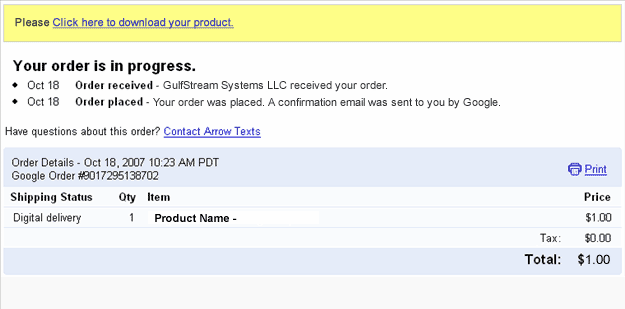
After accessing that link you will get a copy of the product and a copy of the download link will be sent to your email address. Please be sure to check your spam/bulk mail folder if you don't see the email into your inbox.
Are there alternative payment options?
You can pay directly with credit cards through Paypal. If you don't have credit card or your credit card is not accepted by the payment gateway then you can use the alternative methods offered by Paypal and Moneybookers.
You can upload funds to your
Paypal or
MoneyBookers account through bank transfer or alternative methods.
If you can't create a
Paypal account, then you can use
Moneybookers that accepts customers from a wide range of countries and a wide number of credit cards and domestic bank transfers.
Do you include a multi-site license with the single purchase?
Our extensions are "one time purchase" products. That means:
1- You can use it on all your computers.
2- You can use the extension on as many websites as you want (no limit), this includes your own websites and websites created by you for other pleople.
3-
You are not allowed to redistribute the extension to other users.
4-
You are not allowed rebrand or resell the product.
Can I pay using my credit card ?
Yes, Paypal allows you to pay directly using your credit card. You don't need to create a Paypal account to complete the payment.
On the other hand,
MoneyBookers accepts credit cards when uploading funds to your own
MoneyBookers account.
Are these extensions MAC compatible ?
Yes, our extensions are tested in both MAC and PC, you can install and use our extensions in any platform that supports Dreamweaver.
Are these extensions ready for Dreamweaver CS4?
Yes, our extensions are compatible with the most recent Dreamweaver versions.
We also support older Dreamweaver versions, usually Dreamweaver MX, MX 2004, DW 8, CS3 and CS4.
When I preview my web page atfer I get this message in my Internet Explorer,"To help protect your security, Internet Explorer has restricted...". What is the problem?
If you are testing your page directly from your local hard disk in IE 7, this message appears:
"To help protect your security, Internet Explorer has restricted this webpage from running scripts or ActiveX controls that could access your computer. Click here for options."
In IE 7 this message appears when you test a web page that contains a script or Flash item directly form your local hard disk. When you upload your page to an online web server that message does not appear.
The address from a web server must start with http:// or https:// . On the other hand if the address start with C:\ or file:// then you are testing it from your local hard disk.
Just upload your web page to your web site and you will see that the error disappears.
I'm getting this error message "Is not possible to create data structure.". What's happening?
Please, change the "Links relative to" setting in the site configuration options (Dreamweaver 8 or later).
If this setting does not solve the problem, then follow these steps:
- Restart Dreamweaver
- Be sure that you have a local web site defined in Dreamweaver
- Open the page where you want to insert the extension(this page must be saved previously into your web site)
- Try to insert the extension again
Note about sales taxes.
No sales tax is charged when you purchase via
PayPal. You can order via PayPal with a credit card even if you do not have a PayPal account.
PayPal's status as a financial institution exempts PayPal orders from sales tax. CodePeople will be the retailer of record. CodePeople is based in Switzerland and does not have any US sales tax obligations.
I'm getting this error: "TypeError: THE_DOM has no properties" . There is a workaround?
Please follow these steps:
- Check if you have defined a local web site at dreamweaver.
- Check if you have saved the page into your local web site.
- If you are using Dreamweaver templates, check if your templates allow an "Editable Region" in the <HEAD> section of the HTML code.
- Mark the "Use case-sensitive link checking" option in the site settings and recreate your site cache.
- After these checks, please restart your Dreamweaver and try again.
If the above actions don’t solve the problem, then probably the reason is a wrong HTML structure in the page that you are trying to use the product, in this case, please check the page’s HTML structure and if you cannot find the problem then contact our support service.
 TOPDREAMWEAVER